

Articles researched for Google and AI answers.
Realword researches your keyword live, checks what already ranks, then writes a sourced, answer-first article with images, schema and internal links.
Where it fits in the content engine
What is an AI article writer?
An AI article writer generates full-length articles from a keyword or brief. Realword differs in what happens before the writing: a live web research pass reads the top-ranking pages, the People Also Ask questions and the follow-up questions AI assistants split a query into, and the article is written from that brief rather than from the model's memory alone. Every statistic links to its source, and each section adds a point the top pages leave out.
Start freeFour steps. No setup.
Give it a keyword
Primary keyword, supporting keywords, language and target country. Add up to 5 of your own pages to research from, upload research you already have, or start from a Content Ideas gap with the keyword filled in.
Live research runs first
Realword reads the pages ranking now, notes what they miss, and collects People Also Ask and the follow-up questions AI assistants ask.
The article gets written
Pick a length from 1,000 to 4,000 words, the point of view and the reading level. You get answer-first headings, Key Takeaways and at least one table, in the layout the search intent calls for: how-to, listicle, review, comparison or buying guide.
Humanize and publish
Humanize it on the article page, free the first time, then copy it out with images, alt text, schema and internal links.
Everything in one place.
The research happens before the writing.
A general chatbot writes from what it already knows. Realword searches the web first: what the top-ranking pages cover, what they miss, the People Also Ask questions, and statistics traced to their original sources.
- Competitor analysis across the top-ranking pages
- People Also Ask plus AI follow-up questions
- Statistics traced to their original sources
Research from your own pages, or bring your own.
Paste up to 5 links and the research reads only those pages instead of searching the web. Or upload research you already have as a .docx, .pdf, .pptx, .xlsx, .txt or .md file and go straight to writing, without the research step or its credits.
- Up to 5 of your own pages as the only sources
- Upload research as .docx, .pdf, .pptx, .xlsx, .txt or .md
- An uploaded file skips the research step and its credits
yoursite.com/blog/ctr-benchmarks
Every section adds something the top pages miss.
Realword checks what the ranking pages leave out and writes one original point per section, with the limits and counterpoints included. Statistics link to their sources and quotes are copied word for word.
- One original point in every section
- Limits and counterpoints included
- Quotes copied word for word, stats linked
Impressions show where you appear, and clicks show who chose you. Neither tells you why a page stalled, so read the query list before you rewrite anything.
Your point of view, your reading level, your experience.
Choose first, second or third person and a reading level from 5th grade to graduate level. Add a sample post so the article follows how you write. Under Firsthand Experience, add notes on what you actually did: only what you write there goes in as experience, so the article never invents tests or results.
- Point of view and reading level
- A sample post to match your style
- Your own notes as experience, nothing invented
We moved 40 client sites to the new setup in March. Two dropped for a week, then recovered.
Written so AI has something to quote.
A direct answer in the opening lines, Key Takeaways, and paragraphs that make sense on their own. That is the structure AI answer engines tend to pull from when they pick a source to cite, and it reads well on Google too.
- Direct answer first, in the intro and every H2
- Key Takeaways before the first section
- Self-contained paragraphs and named entities
Most verifications finish within a few days. Video verification can take longer.
Make it sound like you without leaving the article.
Press Humanize on the article page and it rewrites the flat lines while tables, code and images stay exactly as they are. The first humanize of every article is free on every plan, and the AI score comes back with the result.
- First humanize of every article is free
- Tables, code and images left untouched
- Switch between the original and humanized versions
Most verifications finish within a few days. If yours takes longer, the video option is usually the reason.
Schema, alt text and internal links included.
The parts that normally need a second pass ship with the draft: JSON-LD ready for your page head or SEO plugin, alt text on every image, and real links to your own pages.
- BlogPosting schema that lists the article's sources
- HowTo, ItemList or FAQPage when the article has them
- Paste straight into your head or SEO plugin
{
  "@context": "https://schema.org",
  "@type": "BlogPosting",
  "headline": "…",
  "citation": [{ "@type": "CreativeWork", "url": "…" }]
}Images per section, with alt text written for you.
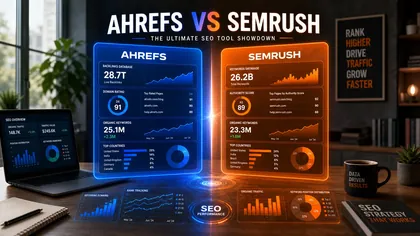
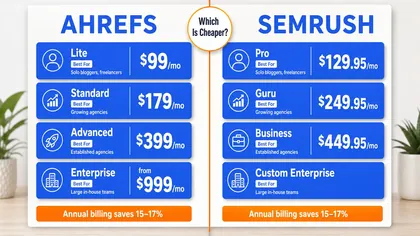
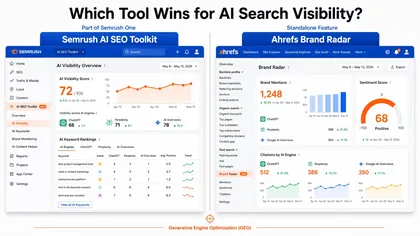
A feature image plus images for the article's main sections, each generated from what that section says rather than a generic stock match, and each given SEO alt text. With a Brand Kit set up, they follow your colours.
- A feature image plus up to 5 section images, your choice
- Prompted from the section's real content
- Brand Kit colours, fonts and mood read from your site
 Feature image
Real links to your own pages.
Give Realword your site's URLs and it places 4 to 6 of them naturally through the article with keyword-rich anchors, roughly one per 300 to 400 words. It never invents a URL or repeats one.
- Only URLs you supplied, never invented
- Keyword-rich anchors, never "click here"
- Distributed naturally, no link dumping
Start by auditing what you already rank for, then map each page to a keyword cluster before writing anything new. Most teams skip the content audit and pay for it later.
Your voice, applied when you humanize.
Writing DNA learns from 500 to 1,500 words of your own writing: sentence rhythm, vocabulary, how you open and close a paragraph. When you humanize an article, it rewrites in that voice. Writing DNA is on the Plus and Growth plans.
- Learned from your samples, not a preset
- Up to 5 saved profiles on Plus, 10 on Growth
- Applied every time you humanize
Built for people who publish.
SEO professionals
Research-backed drafts structured for Google rankings and for AI answers.
See how it works for you →Content agencies
Write client articles, then humanize each one in that client's voice.
See how it works for you →SaaS teams
Comparison and alternatives pages with a table built in.
See how it works for you →Publishers and affiliates
Roundups and reviews with research behind every claim.
See how it works for you →Frequently asked questions.
How is this different from asking ChatGPT to write an article?
Does it invent statistics and sources?
What languages can it write in?
How long can the articles be?
Does it generate images too?
Will the articles read as AI-written?
What does it cost to try?
Try Article Studio free.
Part of one content engine for Google and AI search. Start with free credits, no credit card.